Why use folders and notes?
Folders take a few extra minutes to create, but they offer benefits that make the time worth spending.
1) Folders can help organize applications by position so that they can be quickly and easily located by principals/administrators.
More Information:
2) Folders can control who can see what. As an example, consider a teacher who may be on a selection committee. The teacher, who has no other access, could be given access to only those applications of candidates being considered for a specific position.
More Information:
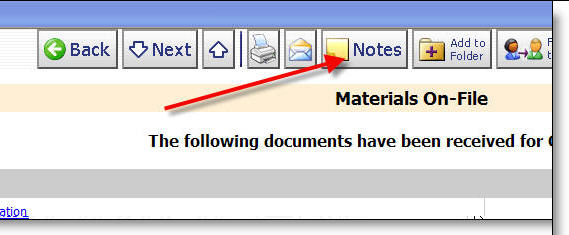
Notes also take a few extra minutes to create and offer many benefits. When viewing an application you can click on the Notes tab.
1) Notes can remind those making hiring decisions of candidates that have been interviewed and those who have not.
2) Notes can rate candidates for future reference.
3) Notes can by used by HR/personnel to record reference call checks rather than just by email so that they are available if a candidate applies for another position.
4) Notes can by used by HR to record when background checks are completed.
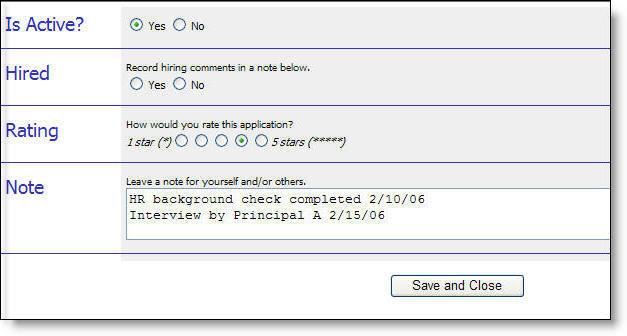
Note: If you require any modification to your note pad please contact support.
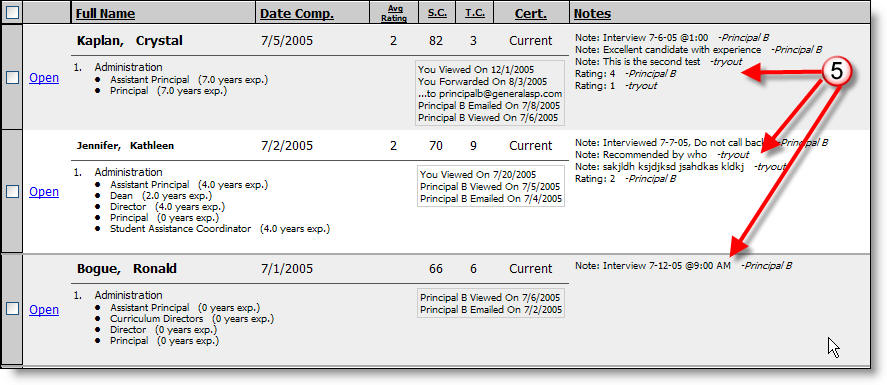
5) Notes can also be viewed when you select a list of applicants.
6) You can search for applications by selecting applicants with "NotePad Values" and then a) "Files with notes" or "Files with notes by me" or b) by specific notes, or even by searchig text in the "Search" section.
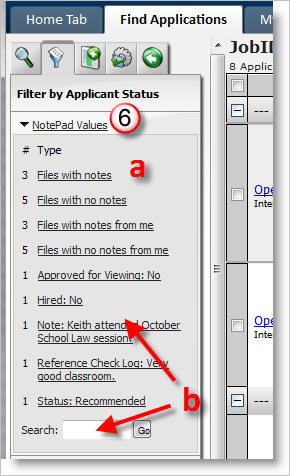
*For more information about searching for notes see the following link: Working With an Applicant List .